Sample output
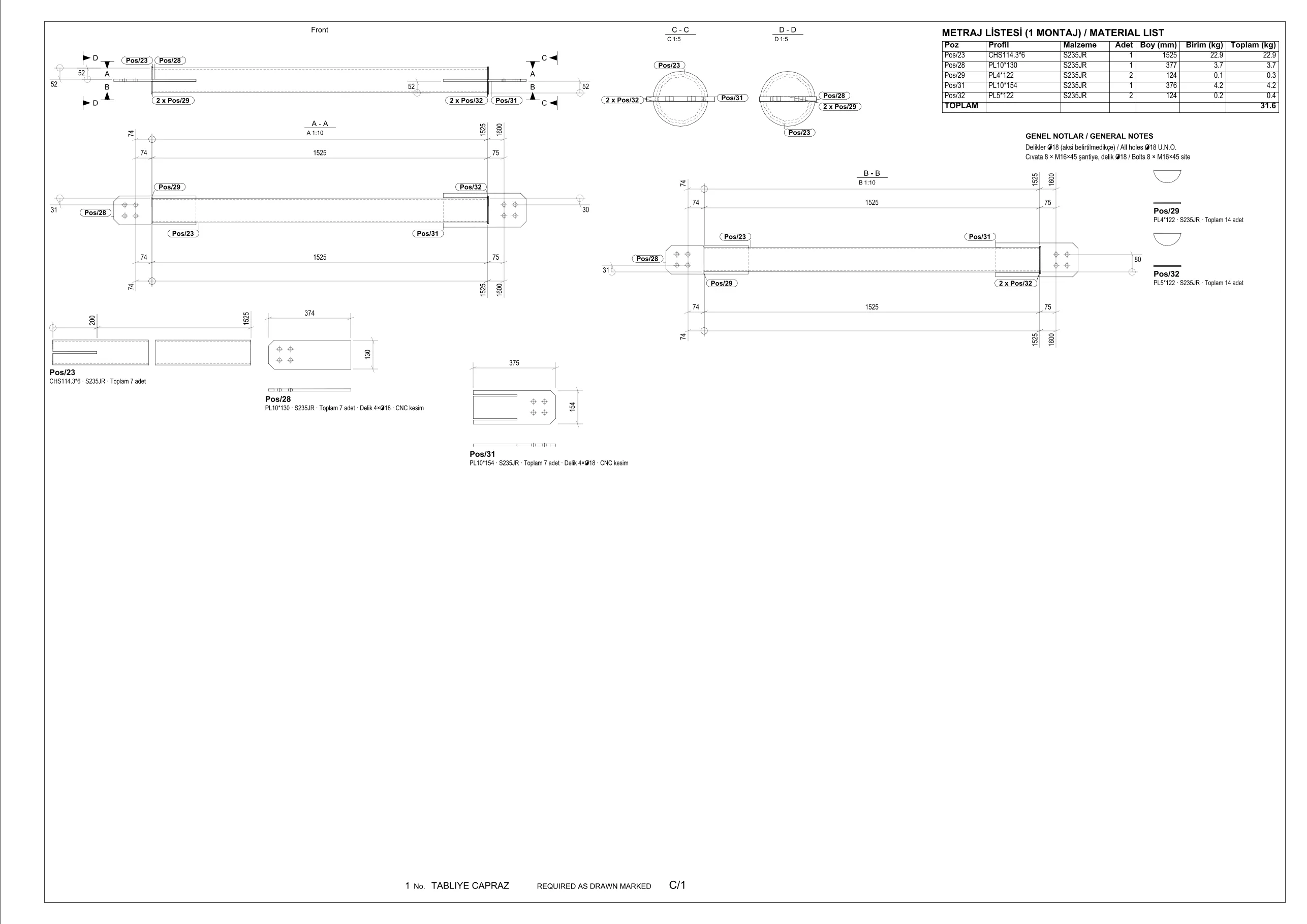
Deck bracing assembly: front view, A-A/B-B sections, 1:5 end sections, single parts, material list and general notes. A2 sheet at 1:10 — paper size and scale are chosen automatically.
Upload a Tekla Structures IFC export or pick it from Google Drive and tick the assemblies. IFCNexus produces a dimensioned fabrication detail, part list and weights for each assembly, delivered as one strip sheet in DXF and PDF.
No card required · free trial: 1 model, 5 assemblies · files deleted after 7 days
Deck bracing assembly: front view, A-A/B-B sections, 1:5 end sections, single parts, material list and general notes. A2 sheet at 1:10 — paper size and scale are chosen automatically.
Drop your IFC file or pick it from Google Drive. Assemblies (IfcElementAssembly) and quantities are listed within seconds.
Tick the assemblies to draw and type a sheet title. Optionally save the output straight into the IFCNexus folder in your Drive.
Views, sections, dimensions, holes, part list and weights are generated per assembly; all details come as one strip sheet in DXF (R2010) and PDF.
A2 / A1 / A0 and 1:10 … 1:50 chosen from the assembly size; if a detail does not fit, it is retried on the next larger sheet.
Running + chain dimensions to hole centres, one locating reference per part, dimensions on the solid side; no redundant dimensions.
Main sections plus 1:5 end sections; bolt holes with clearance (d+2), including holes for bolts of adjacent assemblies.
Mark, profile, grade, quantity, length and weight per assembly; total bill of material at the end of the strip.
Plates and profiles as single parts with hole diameters and CNC cutting note on the same sheet.
Each detail is checked for overlaps, frame overflow and unlocatable positions; results are shown in the job summary.
Layered DXF R2010 (VISIBLE, HIDDEN, HOLE, DIM, MARK, TEXT) and a PDF with one page per detail.
Pick the model from Drive and save the sheet back to Drive. Only files you pick and the IFCNexus folder are accessed (drive.file).
Files are processed only to generate your drawings, deleted after 7 days and never used for model training. Servers in the European Union.
Prices in USD, excluding VAT; tax is added at checkout based on your country. Pay yearly and get 2 months free. Cancel anytime.
The first release is tuned for Tekla Structures IFC2X3 / IFC4 exports: assemblies as IfcElementAssembly, part marks from part names (Pos/n), bolts as IfcMechanicalFastener. Advance Steel and Revit IFC are being tested; upload your model in the free trial to see the result.
No. Existing part and assembly marks in the model are used as they are; IFCNexus never invents numbers. Parts whose mark cannot be read are listed with a question mark.
DXF (R2010) and PDF for now. DXF opens directly in AutoCAD, GstarCAD, BricsCAD, ZWCAD and Tekla. DWG is on the roadmap.
IFCNexus is a drawing generation tool; outputs must be checked by a qualified engineer or detailer before fabrication. Errors and missing data in the input model carry over to the output.
IFC files and outputs are processed only to generate your drawings, deleted from the server after 7 days, never shared with third parties and never used for model training. Files you save to Drive stay in your own account.
Only the drive.file scope: the app can read the files you pick in the picker window and write to the IFCNexus folder it created. It cannot see the rest of your Drive. You can revoke the permission at any time.
A simple beam or bracing assembly takes about a minute, a 20 m truss a few minutes. Jobs run in a queue; you can close the page and download later from 'My models and jobs'.
Cancel anytime and keep using the service until the end of the period. Request a refund within 14 days of your first payment and we refund it. Details in the Refund Policy.